
Die Altersanforderung dieses Spiels wird geprüft…
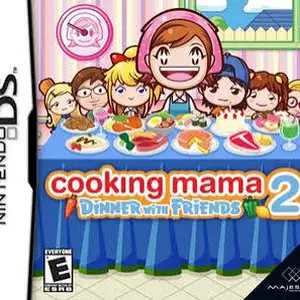
Cooking Mama 2: Dinner With Friends
Über dieses Spiel
Cooking Mama 2: Dinner With Friends is a casual cooking simulation game developed by Office Create and released for Nintendo DS in 2007, the sequel to Cooking Mama series. Players use the NDS stylus to follow Mama’s instructions and cook various dishes. Every cooking task such as chopping, stirring, frying, baking and plating is split into touch-based minigames. Your medal grade depends on your speed and accuracy. The game includes over 80 recipes from different countries, covering main courses, desserts and appetizers. A brand-new friend evaluation system is added, your finished dishes will be tasted and scored by friends. It supports single-card multiplayer cooking competition, and you can wirelessly send demo to other NDS consoles. You can also save photos of finished meals and decorate them with stickers. With warm cartoon art style and easy controls suitable for all ages, it is one of the most beloved casual touch simulation games on NDS.
- Erscheinungsjahr
- 2007
- Entwickler
- Spieler
- Einzelspieler
- Unterstützte Sprachen
- English · 日本語
Häufige Fragen
- Wie kann ich Cooking Mama 2: Dinner With Friends spielen?
- Du kannst Cooking Mama 2: Dinner With Friends kostenlos und online direkt in deinem Browser auf 8BitGo spielen. Es ist kein Download oder Emulator nötig.
- Für welche Plattform ist Cooking Mama 2: Dinner With Friends?
- 8BitGo ordnet diese Version als Nintendo DS ein. Das beschreibt die Laufzeit auf dieser Website und kann von der ursprünglichen Veröffentlichungsplattform abweichen. Du kannst direkt im Browser spielen.
- Kann ich meinen Fortschritt in Cooking Mama 2: Dinner With Friends speichern?
- Die Speicherfunktion hängt von der Laufzeit des Spiels ab. Schnell- und Cloud-Speichern sind nur verfügbar, wenn die Spielerleiste eine Speicherfunktion zeigt; andernfalls nutze die Speicherfunktion des Spiels.
- Funktioniert Cooking Mama 2: Dinner With Friends auf dem Handy?
- Das hängt vom Spiel ab. Prüfe die Steuerung auf dieser Seite: Spiele mit Bildschirmtasten funktionieren per Touch, Spiele mit Tastatur und Maus am besten am Computer.
Steuerung
Das sind die Standardtasten. Klicke im Player auf das Gamepad-Symbol 🎮 und dann auf „Tasten belegen“, um die Tastenbelegung des Emulators zu öffnen (Tastatur und Gamepad, wird automatisch gespeichert). Gamepads werden automatisch erkannt. Auf dem Handy bekommst du Bildschirmtasten.
Steuerkreuz
W S A D
A
K
B
J
X
I
Y
U
L
Q
R
E
Start
Enter
Select
Shift
Schnellspeichern
F2
Schnellladen
F4
Das könnte dir auch gefallen
Gleiche Plattform, gleiches Genre oder vom selben Entwickler
 NDS
NDSCooking Mama
 NDS
NDSPlants vs. Zombies
 NDS
NDSGrand Theft Auto: Chinatown Wars
 NDS
NDSCall of Duty: World at War
 NDS
NDSPokémon SoulSilver
 NDS
NDSPokémon HeartGold
 NDS
NDSPokémon White
 NDS
NDS