
このゲームの年齢制限を確認しています…
ゲーム紹介
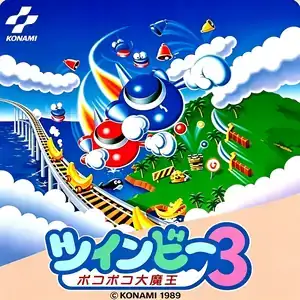
TwinBee 3: Poko Poko Daimaō (Japanese: ツインビー 3 ポコポコ大魔王) is a vertical scrolling shoot 'em up developed and published by Konami for Famicom in 1989. It is the third and final TwinBee title on the Famicom and was released exclusively in Japan. It abandons the horizontal stages from the previous installment and returns to the vertical scrolling format of the original TwinBee, removing 3-player support and limiting gameplay to up to two players in co-op. The story follows TwinBee and WinBee on a rescue mission, as their companion Gwinbee is captured by the evil Poko Poko Demon King. There are five stages total, and players may tackle the first four stages in any order. The iconic bell power-up system returns: shoot clouds to spawn bells, hit them to change colors for buffs such as fire rate boost, multi-shot, shield and clones. The newly added pink bell repairs broken ship arms. Taking damage will break your arms first and disable ground bombs, which can be restored by medical pickups. When two players fly close together, they unleash a powerful combined attack. The unique soul system is introduced: your ship leaves a soul orb upon destruction. Collecting the orb keeps weapon upgrades, and a teammate touching it can revive you. An option menu lets players adjust starting lives and difficulty. It uses PCM sampled voice to announce each stage name. With bright cartoon pixel art and upbeat soundtrack, it is a charming late-era Konami vertical STG for the Famicom.
- 発売年
- 1990
- 開発会社
- プレイ人数
- 1 人用
- 対応言語
- 简体中文 · English · 日本語
よくある質問
- TwinBee 3: Poko Poko Daimaō はどうやって遊べますか?
- 8BitGo ならブラウザでそのまま無料オンラインプレイでき、ダウンロードやエミュレーターのインストールは不要です。
- TwinBee 3: Poko Poko Daimaō はどのプラットフォームのゲームですか?
- 8BitGo ではこのバージョンを ファミコン として分類しています。これは当サイトでの実行方式を示すもので、元の発売プラットフォームとは異なる場合があります。ブラウザですぐ遊べます。
- TwinBee 3: Poko Poko Daimaō の進行状況は保存できますか?
- セーブ対応はゲームの実行方式によって異なります。プレイヤーのツールバーにセーブ操作が表示される場合のみ、クイックセーブやクラウドセーブを利用できます。それ以外はゲーム内の保存機能を使ってください。
- TwinBee 3: Poko Poko Daimaō はスマホでも遊べますか?
- ゲームによって異なります。このページの操作説明を確認してください。画面内ボタンがあるゲームはタッチ操作に対応し、キーボードとマウスが必要なゲームは PC 向けです。
操作方法
以下はデフォルトのキー配置です。 プレイヤー下部のゲームパッドアイコン 🎮 →「キー設定」で、エミュレーター本体のボタン設定を開けます(キーボードとゲームパッドの両方、自動保存)。 ゲームパッドは自動で認識されます。 スマートフォンでは画面上にボタンが表示されます。
十字キー
W S A D
A
K
B
J
Start
Enter
Select
Shift
クイックセーブ
F2
クイックロード
F4
こちらもおすすめ
同じゲーム機・同じジャンル・同じ開発会社の作品
 DOS
DOSAge of Empires
 NES
NESSuper Mario Bros.3
 NDS
NDSPlants vs. Zombies
 NES
NESCircus Charlie
 NES
NESGomoku Narabe Renju
 NDS
NDSGrand Theft Auto: Chinatown Wars
 GBA
GBAThe King of Fighters EX: Neo Blood
 ARCADE