
このゲームの年齢制限を確認しています…
⋯
ゲーム紹介
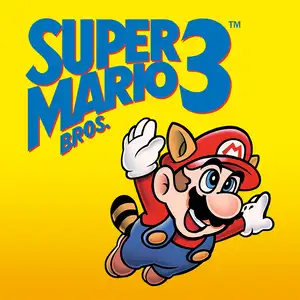
Super Mario Bros.3 is a landmark 2D side-scrolling platform game developed by Nintendo’s Shigeru Miyamoto team, released for Famicom/NES in 1988. Bowser’s seven children, the Koopalings, steal magic wands from seven kingdoms across the Mushroom World and transform the kings into animals. Mario and Luigi embark on a journey through eight themed worlds, defeat bosses to recover wands, and finally storm Bowser’s castle to rescue Princess Peach. The game introduced the world map system, allowing players to pick routes, visit Toad Houses for bonus items and battle wandering Hammer Bros. Items can be stored in inventory and carried between stages. It added many iconic power-ups: the Super Leaf turns Mario into Raccoon Mario with tail attack and temporary flight, plus Frog Suit for better underwater control, Tanooki Suit and Hammer Mario suit. It features varied traps, giant-size stages and airship levels, with 2-player alternating gameplay and massive secrets. With upgraded graphics, level design and soundtrack, it profoundly influenced later 2D platform games and is widely regarded as one of the greatest games on FC.
コントリビューター
コントリビューターの記録はまだありません。
💡 攻略
✎ ガイドを書くまだ攻略はありません
こちらもおすすめ
同じゲーム機・同じジャンル・同じ開発会社の作品
 ARCADE
Double Dragon (Neo-Geo)
 NES
Circus Charlie
 ARCADE
Knights of the Round
 FLASH
THE KING OF FIGHTERS:WING
 FLASH
Gold Miner
 FLASH
cat mario
 ARCADE
Metal Slug X: Super Vehicle 001
 NES
Bomberman II
よくある質問
- Super Mario Bros.3 はどうやって遊べますか?
- 8BitGo ならブラウザでそのまま無料オンラインプレイでき、ダウンロードやエミュレーターのインストールは不要です。
- Super Mario Bros.3 はどのプラットフォームのゲームですか?
- 8BitGo ではこのバージョンを ファミコン として分類しています。これは当サイトでの実行方式を示すもので、元の発売プラットフォームとは異なる場合があります。ブラウザですぐ遊べます。
- Super Mario Bros.3 の進行状況は保存できますか?
- セーブ対応はゲームの実行方式によって異なります。プレイヤーのツールバーにセーブ操作が表示される場合のみ、クイックセーブやクラウドセーブを利用できます。それ以外はゲーム内の保存機能を使ってください。
- Super Mario Bros.3 はスマホでも遊べますか?
- ゲームによって異なります。このページの操作説明を確認してください。画面内ボタンがあるゲームはタッチ操作に対応し、キーボードとマウスが必要なゲームは PC 向けです。
操作方法
以下はデフォルトのキー配置です。 プレイヤー下部のゲームパッドアイコン 🎮 →「キー設定」で、エミュレーター本体のボタン設定を開けます(キーボードとゲームパッドの両方、自動保存)。 ゲームパッドは自動で認識されます。 スマートフォンでは画面上にボタンが表示されます。
1P
十字キー
W S A D
A
K
B
J
Start
Enter
Select
Shift
連射 A
I
連射 B
U
クイックセーブ
F2
クイックロード
F4
2P
十字キー
テンキー 8 2 4 6
A
テンキー 7
B
テンキー 9
Start
テンキー 1
Select
テンキー 3
2P はテンキーを使います(NumLock をオンにしてください)。2 台目のゲームパッドは自動で 2P になります。テンキーがない場合は 🎮 →「キー設定」でプレイヤー 2 に切り替えて別のキーを割り当ててください。