
このゲームの年齢制限を確認しています…
ゲーム紹介
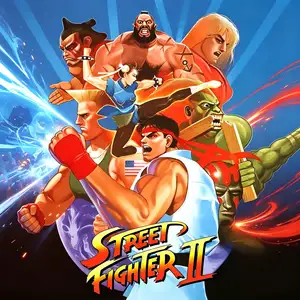
Street Fighter II - The World Warrior is a classic arcade fighting game developed and published by Capcom in 1991, running on the CPS1 arcade board. It is the original base release of the Street Fighter II series and ignited the worldwide fighting game boom. Players can choose from 8 international fighters: Ryu, Ken, Chun-Li, Guile, E. Honda, Dhalsim, Blanka and Zangief. During single-player mode, players will face four Shadaloo boss characters: M.Bison, Balrog, Sagat and Vega, who are unplayable in this original version. The game features the famous six-button layout with light, medium and heavy punches and kicks. It established mature systems for special moves, combos and hit stun. Every fighter has unique fighting styles, debuting iconic moves such as Hadouken, Shoryuken, Sonic Boom and Hyakuretsukyaku. Players must defeat all rivals to compete for the championship of the world martial arts tournament. This title laid the foundation for modern 2D fighting games and created the massive arcade fighting craze of the 1990s. It spawned multiple revised editions including Champion Edition and Hyper Fighting, and was widely ported to many home consoles.
- 発売年
- 1990
- 開発会社
- プレイ人数
- 2 人
- 対応言語
- English
よくある質問
- Street Fighter II - The World Warrior はどうやって遊べますか?
- 8BitGo ならブラウザでそのまま無料オンラインプレイでき、ダウンロードやエミュレーターのインストールは不要です。
- Street Fighter II - The World Warrior はどのプラットフォームのゲームですか?
- 8BitGo ではこのバージョンを アーケード として分類しています。これは当サイトでの実行方式を示すもので、元の発売プラットフォームとは異なる場合があります。ブラウザですぐ遊べます。
- Street Fighter II - The World Warrior の進行状況は保存できますか?
- セーブ対応はゲームの実行方式によって異なります。プレイヤーのツールバーにセーブ操作が表示される場合のみ、クイックセーブやクラウドセーブを利用できます。それ以外はゲーム内の保存機能を使ってください。
- Street Fighter II - The World Warrior はスマホでも遊べますか?
- ゲームによって異なります。このページの操作説明を確認してください。画面内ボタンがあるゲームはタッチ操作に対応し、キーボードとマウスが必要なゲームは PC 向けです。
操作方法
以下はデフォルトのキー配置です。 アーケードは基板ごとにボタン数も意味も違います。上の表は基板の 1〜6 番目のボタンがどのキーに来るかです。ネオジオ(ザ・キング・オブ・ファイターズなど)の A/B/C/D はボタン 1〜4、メタルスラッグは 1・2・4 だけ(ショット / ジャンプ / 手榴弾)、パックマンはボタンを使いません。 3 パンチ 3 キックの 6 ボタン格闘(ストII など)はコアが別の配置に切り替えます:弱パンチ U、中パンチ I、強パンチ Q、弱キック J、中キック K、強キック E。 プレイヤー下部のゲームパッドアイコン 🎮 →「キー設定」で、エミュレーター本体のボタン設定を開けます(キーボードとゲームパッドの両方、自動保存)。 ゲームパッドは自動で認識されます。 スマートフォンでは画面上にボタンが表示されます。
十字キー
W S A D
ボタン 1
J
ボタン 2
K
ボタン 3
U
ボタン 4
I
ボタン 5
E
ボタン 6
Q
コイン投入
V
Start
Enter
クイックセーブ
F2
クイックロード
F4
こちらもおすすめ
同じゲーム機・同じジャンル・同じ開発会社の作品
 DOS
DOSAge of Empires
 NES
NESSuper Mario Bros.3
 NDS
NDSPlants vs. Zombies
 NES
NESCircus Charlie
 NES
NESGomoku Narabe Renju
 NDS
NDSGrand Theft Auto: Chinatown Wars
 GBA
GBAThe King of Fighters EX: Neo Blood
 ARCADE