
このゲームの年齢制限を確認しています…
ゲーム紹介
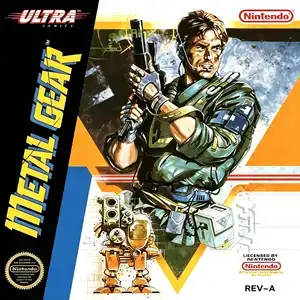
Metal Gear (widely known to Chinese retro gamers as Burning Chariot) is a top-down stealth action game published by Konami and released for Famicom in 1988. It is a heavily modified port of the original MSX2 Metal Gear. Hideo Kojima was not involved in this Famicom adaptation; story and level design were substantially altered. It is the version most Chinese players know. Solid Snake, a rookie agent of FOXHOUND, is dispatched to infiltrate the fortified Outer Heaven stronghold in South Africa on mission Intrude N313. He must rescue missing agent Gray Fox and uncover the secret nuclear weapon project. Gameplay centers on stealth and evasion rather than open combat. Avoid guard sightlines, cameras and infrared sensors. When spotted, an exclamation mark pops above enemies and alarms summon reinforcements. Snake starts unarmed and scavenges gear throughout the base: pistols, machine guns, explosives, keycards and a transceiver radio to receive briefings from Big Boss. Rescuing prisoners raises your rank, while killing prisoners lowers it. Environments include jungle zones and multi-level underground bases, and trucks teleport Snake between areas. This Famicom port makes drastic changes: the iconic Metal Gear mech from MSX2 is removed, replaced with a supercomputer as the final boss. Maps, visuals and soundtrack are remade, and several exclusive bugs are present. The game is puzzle-heavy; missing key items can completely block progression, resulting in high difficulty. In China, pirated cartridges named it Burning Chariot. Bundled widely on Subor multicarts, it stands out as a unique spy stealth classic of the Famicom library.
- 発売年
- 1990
- 開発会社
- プレイ人数
- 1 人用
- 対応言語
- 简体中文 · English · 日本語
よくある質問
- Metal Gear はどうやって遊べますか?
- 8BitGo ならブラウザでそのまま無料オンラインプレイでき、ダウンロードやエミュレーターのインストールは不要です。
- Metal Gear はどのプラットフォームのゲームですか?
- 8BitGo ではこのバージョンを ファミコン として分類しています。これは当サイトでの実行方式を示すもので、元の発売プラットフォームとは異なる場合があります。ブラウザですぐ遊べます。
- Metal Gear の進行状況は保存できますか?
- セーブ対応はゲームの実行方式によって異なります。プレイヤーのツールバーにセーブ操作が表示される場合のみ、クイックセーブやクラウドセーブを利用できます。それ以外はゲーム内の保存機能を使ってください。
- Metal Gear はスマホでも遊べますか?
- ゲームによって異なります。このページの操作説明を確認してください。画面内ボタンがあるゲームはタッチ操作に対応し、キーボードとマウスが必要なゲームは PC 向けです。
操作方法
以下はデフォルトのキー配置です。 プレイヤー下部のゲームパッドアイコン 🎮 →「キー設定」で、エミュレーター本体のボタン設定を開けます(キーボードとゲームパッドの両方、自動保存)。 ゲームパッドは自動で認識されます。 スマートフォンでは画面上にボタンが表示されます。
十字キー
W S A D
A
K
B
J
Start
Enter
Select
Shift
クイックセーブ
F2
クイックロード
F4
こちらもおすすめ
同じゲーム機・同じジャンル・同じ開発会社の作品
 DOS
DOSAge of Empires
 NES
NESSuper Mario Bros.3
 NDS
NDSPlants vs. Zombies
 NES
NESCircus Charlie
 NES
NESGomoku Narabe Renju
 NDS
NDSGrand Theft Auto: Chinatown Wars
 GBA
GBAThe King of Fighters EX: Neo Blood
 ARCADE