
このゲームの年齢制限を確認しています…
ゲーム紹介
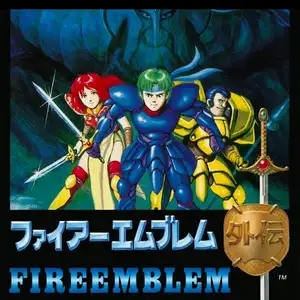
Fire Emblem Gaiden (commonly known in China as Fire Emblem: Saga of Sophia) is the second title of Fire Emblem series, developed by Intelligent Systems and published by Nintendo for Famicom in 1992. It is also the final Fire Emblem game released on Famicom. Set on the continent of Valentia, once protected by goddess Mila and god Duma, the land falls into civil war caused by religious conflicts. The game uses a dual-protagonist structure. Players take turns controlling two separate armies led by Alm and Celica. Alm rises to overthrow the usurper General Desaix, while Celica embarks on a pilgrimage to find the missing goddess Mila. Their storylines gradually converge for the final battle against the dark god Duma. This game is highly experimental and drastically different from other Fire Emblem entries. It removes weapon durability and the classic weapon triangle system. Casting spells consumes the caster’s HP instead of limited uses. It features free-roam overworld map, town NPC conversations and dungeon exploration. Unit promotion is activated at special goddess statues, and villagers have multi-stage promotion options. Permadeath mechanic is retained, and battles can be repeated for grinding. The original version was released only in Japan, and it became popular in China thanks to the fan Chinese localization by Waixing. A full remake, Fire Emblem Echoes: Shadows of Valentia, launched on Nintendo 3DS in 2017. The blend of classic tactical battles and RPG exploration makes it one of the most unique experimental games in the franchise.
- 発売年
- 1990
- 開発会社
- プレイ人数
- 1 人用
- 対応言語
- 简体中文 · English · 日本語
よくある質問
- Fire Emblem Gaiden はどうやって遊べますか?
- 8BitGo ならブラウザでそのまま無料オンラインプレイでき、ダウンロードやエミュレーターのインストールは不要です。
- Fire Emblem Gaiden はどのプラットフォームのゲームですか?
- 8BitGo ではこのバージョンを ファミコン として分類しています。これは当サイトでの実行方式を示すもので、元の発売プラットフォームとは異なる場合があります。ブラウザですぐ遊べます。
- Fire Emblem Gaiden の進行状況は保存できますか?
- セーブ対応はゲームの実行方式によって異なります。プレイヤーのツールバーにセーブ操作が表示される場合のみ、クイックセーブやクラウドセーブを利用できます。それ以外はゲーム内の保存機能を使ってください。
- Fire Emblem Gaiden はスマホでも遊べますか?
- ゲームによって異なります。このページの操作説明を確認してください。画面内ボタンがあるゲームはタッチ操作に対応し、キーボードとマウスが必要なゲームは PC 向けです。
操作方法
以下はデフォルトのキー配置です。 プレイヤー下部のゲームパッドアイコン 🎮 →「キー設定」で、エミュレーター本体のボタン設定を開けます(キーボードとゲームパッドの両方、自動保存)。 ゲームパッドは自動で認識されます。 スマートフォンでは画面上にボタンが表示されます。
十字キー
W S A D
A
K
B
J
Start
Enter
Select
Shift
クイックセーブ
F2
クイックロード
F4
こちらもおすすめ
同じゲーム機・同じジャンル・同じ開発会社の作品
 DOS
DOSAge of Empires
 NES
NESSuper Mario Bros.3
 NDS
NDSPlants vs. Zombies
 NES
NESCircus Charlie
 NES
NESGomoku Narabe Renju
 NDS
NDSGrand Theft Auto: Chinatown Wars
 GBA
GBAThe King of Fighters EX: Neo Blood
 ARCADE