
このゲームの年齢制限を確認しています…
ゲーム紹介
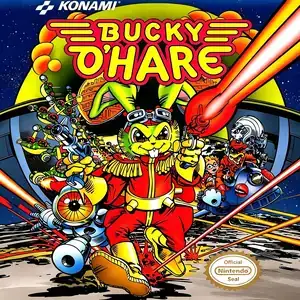
Bucky O'Hare (Japanese: バッキーオヘア,known to Chinese retro gamers as Alien Warrior or Space Hare) is a high-quality side-scrolling action platformer developed and published by Konami, released for Famicom on January 31, 1992. It is adapted from the classic American comic and animated series. Set in an alternate universe, the Toad Empire launches a brutal invasion. Captain Bucky O'Hare’s starship is attacked, and four crewmates are imprisoned on four separate planets. Bucky must travel across worlds, rescue his teammates and stop the Toad Empire’s evil plan. The standout gameplay feature: players may tackle the first four planetary stages in any order. Each rescued teammate becomes playable with unique abilities. Blinky the robot uses jetpack flight and breaks ice blocks; Jenny the cat charges energy orbs; Deadeye the duck climbs vertical walls; Willy the human boy fires piercing laser shots. You must swap characters to solve environmental puzzles. The game combines side-scrolling platform stages and vertical space shooter segments in later missions, with 8 stages total. It is famous for its anti-piracy trap. Pirated multicarts modified the copyright text, triggering a secret hard mode where the character dies from a single hit. Many Chinese players back then thought this was the normal difficulty. The legitimate cartridge uses a health bar system. It features varied enemies and creative bosses, beautiful pixel art and energetic soundtrack from Konami Kukeiha Club, with password save for progress. Several core developers later founded Treasure, creators of Gunstar Heroes. Widely included on Subor multicarts in China, its character swap system, free stage selection and brilliant level design make it a legendary late-era Famicom action masterpiece.
- 発売年
- 1992
- 開発会社
- プレイ人数
- 1 人用
- 対応言語
- 简体中文 · English · 日本語 · Español
よくある質問
- Bucky O'Hare はどうやって遊べますか?
- 8BitGo ならブラウザでそのまま無料オンラインプレイでき、ダウンロードやエミュレーターのインストールは不要です。
- Bucky O'Hare はどのプラットフォームのゲームですか?
- 8BitGo ではこのバージョンを ファミコン として分類しています。これは当サイトでの実行方式を示すもので、元の発売プラットフォームとは異なる場合があります。ブラウザですぐ遊べます。
- Bucky O'Hare の進行状況は保存できますか?
- セーブ対応はゲームの実行方式によって異なります。プレイヤーのツールバーにセーブ操作が表示される場合のみ、クイックセーブやクラウドセーブを利用できます。それ以外はゲーム内の保存機能を使ってください。
- Bucky O'Hare はスマホでも遊べますか?
- ゲームによって異なります。このページの操作説明を確認してください。画面内ボタンがあるゲームはタッチ操作に対応し、キーボードとマウスが必要なゲームは PC 向けです。
操作方法
以下はデフォルトのキー配置です。 プレイヤー下部のゲームパッドアイコン 🎮 →「キー設定」で、エミュレーター本体のボタン設定を開けます(キーボードとゲームパッドの両方、自動保存)。 ゲームパッドは自動で認識されます。 スマートフォンでは画面上にボタンが表示されます。
十字キー
W S A D
A
K
B
J
Start
Enter
Select
Shift
クイックセーブ
F2
クイックロード
F4
こちらもおすすめ
同じゲーム機・同じジャンル・同じ開発会社の作品
Contra
 NES
NESTeenage Mutant Ninja Turtles III: The Manhattan Project
 NES
NESYie Ar Kung-Fu
 NES
NESSuper Contra
 NES
NESMonster in My Pocket
 JAVA
JAVASilent Hill
 JAVA
JAVASilent Hill Mobile 3
 NDS
NDS