
Verifica del requisito di età del gioco…
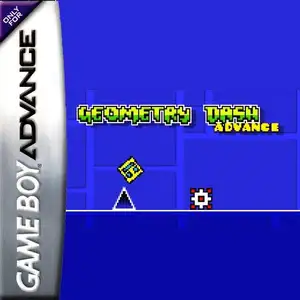
Geometry Dash Advance
Informazioni sul gioco
Geometry Dash Advance is a fan-made GBA demake created by AleFunky, not an official Nintendo game. It ports the famous rhythm platformer Geometry Dash to the Game Boy Advance handheld console. The game keeps the core gameplay of the original work. Players control a cube icon that moves forward automatically, press the A button to jump in sync with electronic music beats and dodge spikes, saw blades and other hazards. Hitting any obstacle restarts the level instantly. It features classic auto-scrolling mode and platformer mode with free left-right movement. Portals transform your icon into ship, ball, UFO and other forms with unique physics. It supports practice mode with checkpoints, includes original main levels, many custom user levels and an endless randomly generated mode. Icon customization and music test screen are also available. It uses GBA pixel graphics to recreate the original geometric art style, and it is a popular fan ROM within retro handheld communities.
- Anno di uscita
- 1990
- Sviluppatore
- Giocatori
- Giocatore singolo
- Lingue supportate
- English
Domande frequenti
- Come posso giocare a Geometry Dash Advance?
- Puoi giocare a Geometry Dash Advance online e gratuitamente direttamente nel tuo browser su 8BitGo. Non è richiesto alcun download né l'installazione di emulatori.
- Su quale piattaforma è Geometry Dash Advance?
- 8BitGo classifica questa versione come Game Boy Advance. Questo descrive come viene eseguita qui e può differire dalla piattaforma di uscita originale. Puoi giocare direttamente nel browser.
- Posso salvare i miei progressi in Geometry Dash Advance?
- Il supporto ai salvataggi dipende da come viene eseguito il gioco. Salvataggi rapidi e cloud sono disponibili solo se la barra del player mostra il relativo comando; altrimenti usa il salvataggio interno del gioco.
- Geometry Dash Advance funziona su mobile?
- Dipende dal gioco. Controlla i comandi in questa pagina: i giochi con pulsanti su schermo funzionano via touch, mentre quelli con tastiera e mouse sono più adatti al computer.
Comandi
Questi sono i tasti predefiniti. Fai clic sull’icona del gamepad 🎮 nella barra del player, poi su «Rimappa i tasti» per aprire le impostazioni dei controlli dell’emulatore (tastiera e gamepad, salvate automaticamente). I gamepad vengono rilevati in automatico. Su smartphone compaiono i pulsanti a schermo.
Croce direzionale
W S A D
A
K
B
J
L
Q
R
E
Start
Enter
Select
Shift
Salvataggio rapido
F2
Caricamento rapido
F4
Potrebbe piacerti anche
Stessa piattaforma, stesso genere o stesso sviluppatore
 GBA
GBAGrand Theft Auto:Advance
 GBA
GBASan Goku Shi
 GBA
GBAKirby & The Amazing Mirror
 GBA
GBAThe Legend of Zelda: The Minish Cap
 GBA
GBAThe Legend of Sword and Fairy
 GBA
GBAMario Kart: Super Circuit
 GBA
GBAChobits: Atashi Dake no Hito
 GBA
GBA