
Verifica del requisito di età del gioco…
Informazioni sul gioco
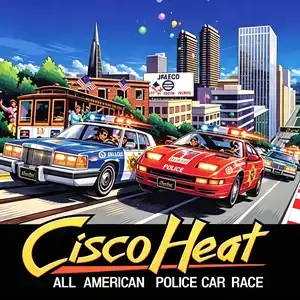
Cisco Heat, full title *Cisco Heat: All American Police Car Race*, is an arcade racing game developed and published by Jaleco, released October 1990. It was released in upright, two-player and deluxe simulator cabinet variants. Set in the hilly streets of San Francisco, players compete in a national police car steeplechase championship. Choose between two police vehicles: a Cadillac-style heavy squad car with raw power, or a Nissan 300ZX variant with superior handling. The game uses chase third-person perspective and two-speed gear shifting. Its most notable feature is sharp 90-degree corners and steep undulating hills across famous landmarks including Golden Gate Bridge and Fisherman's Wharf. Players can honk the horn to force civilian traffic such as trams and taxis out of the way. Reach checkpoints to extend the countdown timer across five race stages. Powered by multiple Motorola 68000 CPUs and Yamaha YM2151 sound chip. The original arcade version is English. It was ported to DOS, Amiga, C64 and Atari ST in 1991. The arcade ROM runs on MAME emulator, Jaleco’s urban racing competitor against Sega OutRun series.
- Anno di uscita
- 1990
- Sviluppatore
- Giocatori
- Giocatore singolo
- Lingue supportate
- English
Domande frequenti
- Come posso giocare a Cisco Heat?
- Puoi giocare a Cisco Heat online e gratuitamente direttamente nel tuo browser su 8BitGo. Non è richiesto alcun download né l'installazione di emulatori.
- Su quale piattaforma è Cisco Heat?
- 8BitGo classifica questa versione come Arcade. Questo descrive come viene eseguita qui e può differire dalla piattaforma di uscita originale. Puoi giocare direttamente nel browser.
- Posso salvare i miei progressi in Cisco Heat?
- Il supporto ai salvataggi dipende da come viene eseguito il gioco. Salvataggi rapidi e cloud sono disponibili solo se la barra del player mostra il relativo comando; altrimenti usa il salvataggio interno del gioco.
- Cisco Heat funziona su mobile?
- Dipende dal gioco. Controlla i comandi in questa pagina: i giochi con pulsanti su schermo funzionano via touch, mentre quelli con tastiera e mouse sono più adatti al computer.
Comandi
Questi sono i tasti predefiniti. Ogni scheda arcade ha un numero di tasti diverso e attribuisce loro significati diversi. Sopra trovi i tasti da 1 a 6 della scheda: sulle Neo Geo (The King of Fighters e affini) A/B/C/D sono i tasti 1–4, Metal Slug usa solo 1, 2 e 4 (sparo / salto / granata) e Pac-Man non ne usa nessuno. I picchiaduro a sei tasti con tre pugni e tre calci (Street Fighter II e simili) ricevono dal core un altro schema: pugno debole U, pugno medio I, pugno forte Q, calcio debole J, calcio medio K, calcio forte E. Fai clic sull’icona del gamepad 🎮 nella barra del player, poi su «Rimappa i tasti» per aprire le impostazioni dei controlli dell’emulatore (tastiera e gamepad, salvate automaticamente). I gamepad vengono rilevati in automatico. Su smartphone compaiono i pulsanti a schermo.
Croce direzionale
W S A D
Tasto 1
J
Tasto 2
K
Tasto 3
U
Tasto 4
I
Tasto 5
E
Tasto 6
Q
Inserisci moneta
V
Start
Enter
Salvataggio rapido
F2
Caricamento rapido
F4
Potrebbe piacerti anche
Stessa piattaforma, stesso genere o stesso sviluppatore
 NES
NESSaiyuuki World 2 - Tenjoukai no Majin
 ARCADE
Big Run
 ARCADE
Super Hang-On
 ARCADE
Hang-On
 ARCADE
Chase H.Q.
The King of Fighters ’97
Cadillacs and Dinosaurs
 ARCADE