Die Altersanforderung dieses Spiels wird geprüft…
Need for Speed
Über dieses Spiel
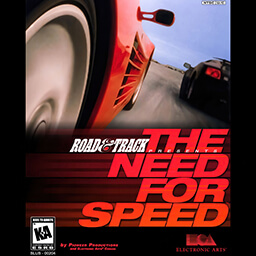
The Need for Speed DOS is the original classic racing game developed by EA, officially ported to the MS-DOS platform in 1995. It is the only official DOS version in the entire Need for Speed series and a milestone work that pioneered modern street racing games. Initially released for 3DO in 1994, it was later perfectly adapted for DOS systems, becoming a benchmark realistic racing game for PC players in the 1990s. Co-developed with the famous automotive media Road & Track, the game highly restores the real driving physics and appearance of luxury sports cars. It features eight high-performance vehicles including Lamborghini, Ferrari, Porsche and Toyota Supra, with unique acceleration, braking and drifting feel for each car. There are six original tracks covering mountain roads, coastal highways and urban circuits, including open road races and closed circuit races, bringing diverse racing experiences. The core gameplay includes time trial mode and AI versus mode, with optional manual and automatic transmission. It simulates real racing physics such as speed control, corner deceleration and high-speed skidding, offering profound operating strategies instead of casual arcade racing. Players need to control speed accurately, avoid track obstacles, refresh the fastest lap time and defeat AI opponents to win races. The 1996 Special Edition adds exclusive tracks and optimizes the game engine for better visual quality and stability. As a rare vintage racing classic for DOS, all subsequent Need for Speed titles no longer support DOS systems, making this version highly valuable for retro game collection. It can run perfectly through DOSBox emulators without complex configuration, restoring the authentic old PC racing experience. It remains a must-play classic DOS racing game for retro PC game enthusiasts.
- Erscheinungsjahr
- 1995
- Entwickler
- Spieler
- Einzelspieler
- Unterstützte Sprachen
- English
Häufige Fragen
- Wie kann ich Need for Speed spielen?
- Du kannst Need for Speed kostenlos und online direkt in deinem Browser auf 8BitGo spielen. Es ist kein Download oder Emulator nötig.
- Für welche Plattform ist Need for Speed?
- 8BitGo ordnet diese Version als DOS-PC-Spiele ein. Das beschreibt die Laufzeit auf dieser Website und kann von der ursprünglichen Veröffentlichungsplattform abweichen. Du kannst direkt im Browser spielen.
- Kann ich meinen Fortschritt in Need for Speed speichern?
- Die Speicherfunktion hängt von der Laufzeit des Spiels ab. Schnell- und Cloud-Speichern sind nur verfügbar, wenn die Spielerleiste eine Speicherfunktion zeigt; andernfalls nutze die Speicherfunktion des Spiels.
- Funktioniert Need for Speed auf dem Handy?
- Das hängt vom Spiel ab. Prüfe die Steuerung auf dieser Seite: Spiele mit Bildschirmtasten funktionieren per Touch, Spiele mit Tastatur und Maus am besten am Computer.
Steuerung
Diese Spiele bekommen die Tastatur direkt — die Belegung legt das Spiel selbst fest, meist in seinem Hilfe- oder Optionsbildschirm. Gamepads werden automatisch erkannt. Auf dem Handy bekommst du Bildschirmtasten.
Das könnte dir auch gefallen
Gleiche Plattform, gleiches Genre oder vom selben Entwickler