このゲームの年齢制限を確認しています…
Harvest Moon 3 GBC
ゲーム紹介
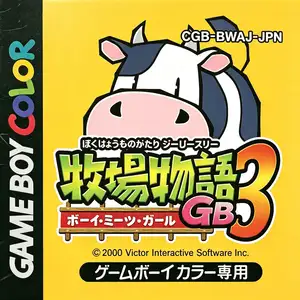
Bokujou Monogatari GB3: Boy Meets Girl (Harvest Moon 3 GBC) is a farming life simulation developed and published by Victor Interactive Software, released September 29, 2000 exclusively for Game Boy Color. It is the final entry of the original GB trilogy and the first handheld Harvest Moon title to introduce romance and marriage mechanics, continuing the story from Harvest Moon 2 GBC. Set on an island farm, players pick male or female protagonist with separate storylines. An opposite-sex partner joins to rebuild the abandoned farm within three years. Male characters excel at crop farming and mining, while female characters are better at animal care; farm chores can be delegated to your partner. New paddy field system allows rice and wheat cultivation. Horses can be raised in quantity and entered into horse races. Players take a ferry between the island and mainland village, explore caves and volcanoes, attend seasonal festivals and build friendship with townsfolk. Romance and marriage are only available with your farm partner, with different endings for male and female playthroughs. It supports link cable multiplayer for item trading. Original Japanese release, North American English version published by Natsume in 2001. Fan translated ROMs circulate domestically and playable on GBC flash carts or emulators, a beloved cozy farming sim on Game Boy Color.
- 発売年
- 2000
- 開発会社
- プレイ人数
- 1 人用
- 対応言語
- 简体中文
よくある質問
- Harvest Moon 3 GBC はどうやって遊べますか?
- 8BitGo ならブラウザでそのまま無料オンラインプレイでき、ダウンロードやエミュレーターのインストールは不要です。
- Harvest Moon 3 GBC はどのプラットフォームのゲームですか?
- 8BitGo ではこのバージョンを Game Boy Color として分類しています。これは当サイトでの実行方式を示すもので、元の発売プラットフォームとは異なる場合があります。ブラウザですぐ遊べます。
- Harvest Moon 3 GBC の進行状況は保存できますか?
- セーブ対応はゲームの実行方式によって異なります。プレイヤーのツールバーにセーブ操作が表示される場合のみ、クイックセーブやクラウドセーブを利用できます。それ以外はゲーム内の保存機能を使ってください。
- Harvest Moon 3 GBC はスマホでも遊べますか?
- ゲームによって異なります。このページの操作説明を確認してください。画面内ボタンがあるゲームはタッチ操作に対応し、キーボードとマウスが必要なゲームは PC 向けです。
操作方法
以下はデフォルトのキー配置です。 プレイヤー下部のゲームパッドアイコン 🎮 →「キー設定」で、エミュレーター本体のボタン設定を開けます(キーボードとゲームパッドの両方、自動保存)。 ゲームパッドは自動で認識されます。 スマートフォンでは画面上にボタンが表示されます。
十字キー
W S A D
A
K
B
J
Start
Enter
Select
Shift
クイックセーブ
F2
クイックロード
F4
こちらもおすすめ
同じゲーム機・同じジャンル・同じ開発会社の作品