Verifica del requisito di età del gioco…
WinDepth
Informazioni sul gioco
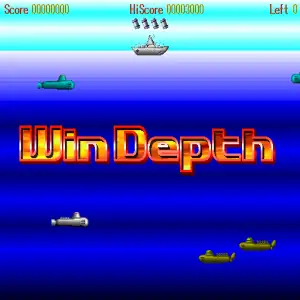
WinDepth, also known as Submarine Battle, is a classic freeware arcade‑style action game developed by Japanese indie group Bio‑100%, released February 20, 1995 for Windows 95. It is a port of the PC‑98 title SuperDepth, and can be played under DOSBox Windows‑95 emulation for retro‑game collections. You control a destroyer warship moving horizontally on the sea surface, dropping depth‑charges to sink hostile submarines and underwater creatures. Depth charges fall with delay, requiring precise timing and prediction. Destroyed submarines can trigger chain explosions for huge combo score bonuses. Ammo is limited; each sunken submarine restores one depth‑charge. Enemies include multiple submarine variants laying mines and homing torpedoes, tentacle monsters, sea mutants and stage bosses. Hit special green targets to unlock air‑support bombing runs. Bonus stages let you wipe out whole submarine formations for massive points. Featuring 20 looping stages, mouse and keyboard controls, and built‑in high‑score leaderboard, WinDepth is a beloved lightweight retro arcade freeware from the Windows 95 era.
- Anno di uscita
- 1995
- Sviluppatore
- Giocatori
- Giocatore singolo
- Lingue supportate
- English
Domande frequenti
- Come posso giocare a WinDepth?
- Puoi giocare a WinDepth online e gratuitamente direttamente nel tuo browser su 8BitGo. Non è richiesto alcun download né l'installazione di emulatori.
- Su quale piattaforma è WinDepth?
- 8BitGo classifica questa versione come Giochi PC DOS. Questo descrive come viene eseguita qui e può differire dalla piattaforma di uscita originale. Puoi giocare direttamente nel browser.
- Posso salvare i miei progressi in WinDepth?
- Il supporto ai salvataggi dipende da come viene eseguito il gioco. Salvataggi rapidi e cloud sono disponibili solo se la barra del player mostra il relativo comando; altrimenti usa il salvataggio interno del gioco.
- WinDepth funziona su mobile?
- Dipende dal gioco. Controlla i comandi in questa pagina: i giochi con pulsanti su schermo funzionano via touch, mentre quelli con tastiera e mouse sono più adatti al computer.
Comandi
Questi giochi ricevono la tastiera direttamente: i comandi sono quelli definiti dal gioco stesso, di solito nella sua schermata di aiuto o opzioni. I gamepad vengono rilevati in automatico. Su smartphone compaiono i pulsanti a schermo.
Potrebbe piacerti anche
Stessa piattaforma, stesso genere o stesso sviluppatore