
Vérification de la limite d’âge de ce jeu…
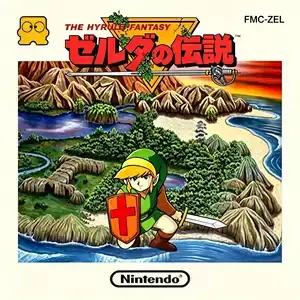
The Legend of Zelda:The Hyrule Fantasy
À propos du jeu
The Legend of Zelda (Japanese: ゼルダの伝説 The Hyrule Fantasy, known to Chinese retro players as Hyrule Fantasy) is a top-down action-adventure game developed by Nintendo R&D4 and designed by Shigeru Miyamoto. It first launched for the Famicom Disk System in 1986, and received a Famicom cartridge port in 1992. It is the original debut entry of The Legend of Zelda franchise and created the blueprint for top-down action adventure games. In the kingdom of Hyrule, the dark lord Ganon invades and seizes the Triforce of Power. Before being captured, Princess Zelda splits the Triforce of Wisdom into eight fragments and hides them inside underground dungeons across the land, sending her nursemaid Impa to find a hero. The young boy Link takes up the quest to explore Hyrule, recover all eight fragments, venture into Death Mountain, defeat Ganon and rescue Princess Zelda. Its revolutionary design features a fully open non-linear overworld. Players are free to travel across the whole map right from the start, discovering hidden caves and secrets in bushes and walls. The real-time top-down combat features swords, shields, arrows, bombs, boomerangs and magic wands, and items are used to solve environmental puzzles. There is no character leveling; extra heart containers found in secret areas increase your maximum health. The disk version supports built-in save, while the later cartridge release uses password save. After beating the game, a harder second quest unlocks with completely rearranged dungeons and enemy layouts. Its groundbreaking open-world exploration, dungeon puzzles and secret mechanics influenced generations of adventure games. Most Chinese players experienced it via emulators, and the fan Chinese translation commonly uses the name "Hyrule Fantasy". It stands as one of the most legendary masterpieces in Famicom gaming history.
- Année de sortie
- 1986
- Développeur
- Joueurs
- 1 joueur
- Langues prises en charge
- 简体中文 · English · Español
FAQ
- Comment jouer à The Legend of Zelda:The Hyrule Fantasy ?
- Vous pouvez jouer à The Legend of Zelda:The Hyrule Fantasy en ligne et gratuitement directement dans votre navigateur sur 8BitGo. Aucun téléchargement ni installation d'émulateur n'est nécessaire.
- Sur quelle plateforme est The Legend of Zelda:The Hyrule Fantasy ?
- 8BitGo classe cette version dans la catégorie NES (Famicom). Cela décrit son mode d'exécution ici et peut différer de la plateforme de sortie d'origine. Vous pouvez jouer directement dans le navigateur.
- Puis-je sauvegarder ma progression dans The Legend of Zelda:The Hyrule Fantasy ?
- La sauvegarde dépend du mode d'exécution du jeu. Les sauvegardes rapides et cloud ne sont disponibles que si la barre du lecteur affiche une commande de sauvegarde ; sinon, utilisez la sauvegarde intégrée au jeu.
- The Legend of Zelda:The Hyrule Fantasy fonctionne-t-il sur mobile ?
- Cela dépend du jeu. Consultez les commandes sur cette page : les jeux avec boutons à l'écran fonctionnent au tactile, tandis que les jeux au clavier et à la souris sont mieux adaptés à un ordinateur.
Commandes
Voici les touches par défaut. Cliquez sur l’icône de manette 🎮 dans la barre du lecteur, puis sur « Redéfinir les touches » pour ouvrir les réglages de commandes de l’émulateur (clavier et manette, enregistrés automatiquement). Les manettes sont détectées automatiquement. Sur téléphone, des boutons virtuels s’affichent.
Croix directionnelle
W S A D
A
K
B
J
Start
Enter
Select
Shift
Sauvegarde rapide
F2
Chargement rapide
F4
Tu aimeras peut-être aussi
Même plateforme, même genre, ou même développeur
 NES
NESSuper Mario Bros.
Contra
 NES
NESSuper Mario Bros.3
 NES
NESTeenage Mutant Ninja Turtles III: The Manhattan Project
 NES
NESCircus Charlie
 NES
NESRoad Fighter
 NES
NESBomberman II
 NES
NES