
Vérification de la limite d’âge de ce jeu…
Pinball
À propos du jeu
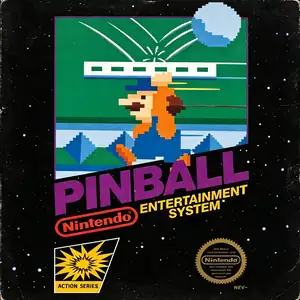
Pinball was co‑developed by Nintendo and HAL Laboratory and published by Nintendo. It launched for Famicom in 1984, and was one of the 18 launch titles for the North American NES in 1985. Adapted from Nintendo’s earlier Game & Watch pinball title, it stands as a landmark virtual pinball simulation of the 8‑bit console era. Players operate flippers to bounce the metal ball, hit targets and bumpers to earn high scores, and prevent the ball from falling out at the bottom. The playfield is split into upper and lower sections where the ball can travel back and forth. It features interactive gimmicks including seal bumpers, penguin obstacles and card‑flipping scoring mechanics. Two speed settings Mode A and Mode B are available, alongside alternating 1‑2‑player competitive gameplay for high‑score challenges. The highlight is its iconic bonus stage featuring Mario holding a moving platform to keep the ball airborne, while players attempt to rescue Pauline for massive bonus points, a charming early‑Nintendo easter egg. The game was later ported to the Famicom Disk System and included as a minigame in the Animal Crossing series. With intuitive controls and authentic arcade‑style 8‑bit chiptune audio, Pinball remains a beloved retro pinball title and can be fully experienced on modern hardware via emulators。
- Année de sortie
- 1984
- Développeur
- ,
- Joueurs
- 1 joueur
- Langues prises en charge
- 简体中文 · English
FAQ
- Comment jouer à Pinball ?
- Vous pouvez jouer à Pinball en ligne et gratuitement directement dans votre navigateur sur 8BitGo. Aucun téléchargement ni installation d'émulateur n'est nécessaire.
- Sur quelle plateforme est Pinball ?
- 8BitGo classe cette version dans la catégorie NES (Famicom). Cela décrit son mode d'exécution ici et peut différer de la plateforme de sortie d'origine. Vous pouvez jouer directement dans le navigateur.
- Puis-je sauvegarder ma progression dans Pinball ?
- La sauvegarde dépend du mode d'exécution du jeu. Les sauvegardes rapides et cloud ne sont disponibles que si la barre du lecteur affiche une commande de sauvegarde ; sinon, utilisez la sauvegarde intégrée au jeu.
- Pinball fonctionne-t-il sur mobile ?
- Cela dépend du jeu. Consultez les commandes sur cette page : les jeux avec boutons à l'écran fonctionnent au tactile, tandis que les jeux au clavier et à la souris sont mieux adaptés à un ordinateur.
Commandes
Voici les touches par défaut. Cliquez sur l’icône de manette 🎮 dans la barre du lecteur, puis sur « Redéfinir les touches » pour ouvrir les réglages de commandes de l’émulateur (clavier et manette, enregistrés automatiquement). Les manettes sont détectées automatiquement. Sur téléphone, des boutons virtuels s’affichent.
Croix directionnelle
W S A D
A
K
B
J
Start
Enter
Select
Shift
Sauvegarde rapide
F2
Chargement rapide
F4
Tu aimeras peut-être aussi
Même plateforme, même genre, ou même développeur
 GBA
GBAKirby: Nightmare in Dream Land
 GBA
GBAKirby & The Amazing Mirror
 NES
NESSuper Mario Bros.
Contra
 NES
NESSuper Mario Bros.3
 NES
NESTeenage Mutant Ninja Turtles III: The Manhattan Project
 NES
NESCircus Charlie
 NES
NES